color palette
#1b2d40
#d6e2ee
#6fb8e3
#f2fcff
#4d9ed3
#1b2d40
#1b2d40
#4d86b0
#5e95bc
#6fa4c9
#6fb8e3
#8bc9eb
#b4e4f6
#d6e2ee
#4A6B80
#73a6cb
#86b7d8
#9dcae5
#f2fcff
#b1d8ee
#d1eef8
#ffffff
preview
readme
Omarchy Lumon Theme
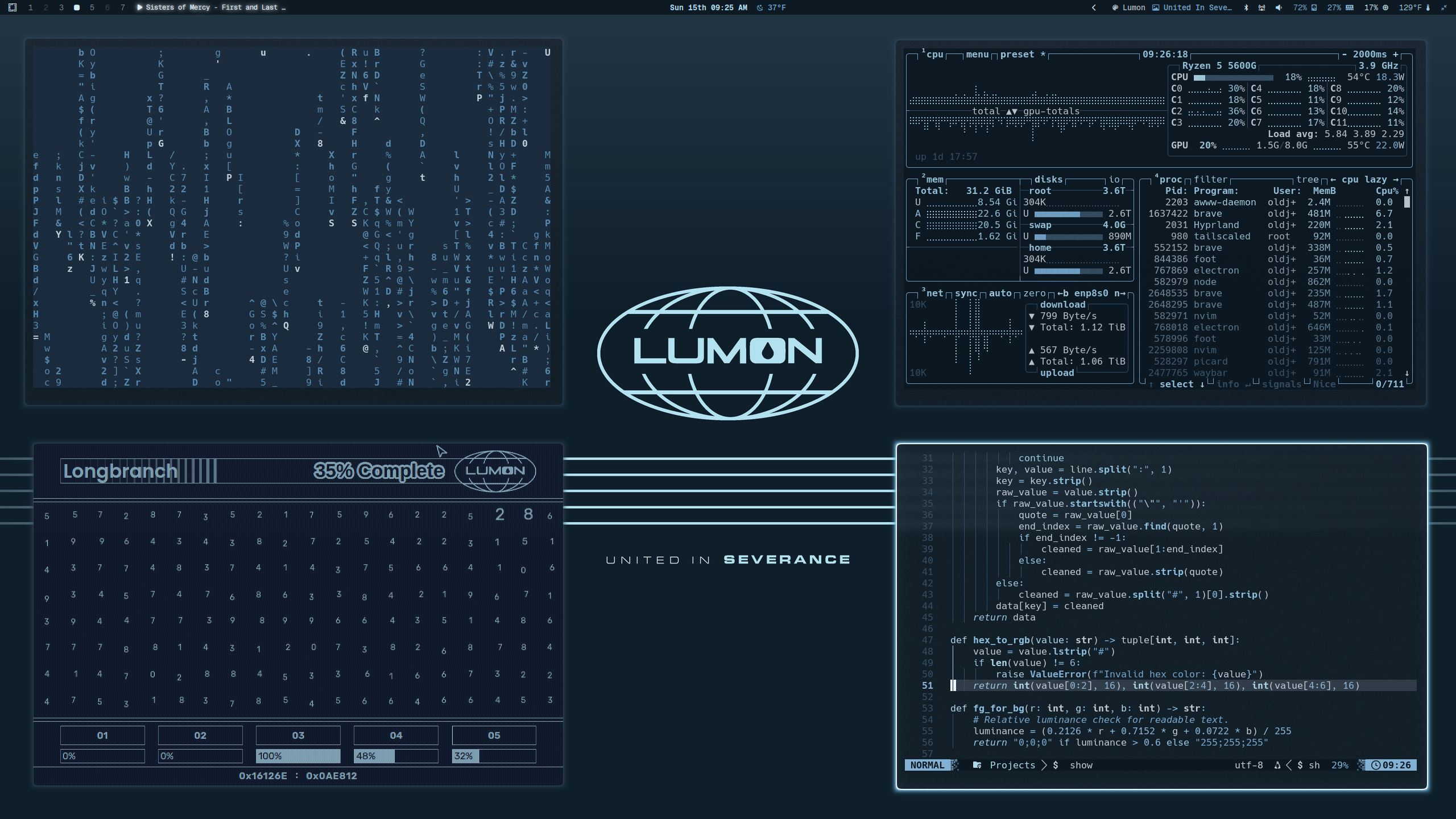
A cold corporate Omarchy theme inspired by Lumon Industries and the terminal palettes of Severance: navy voids, fluorescent cyan edges, sterile blue-gray surfaces, and enough institutional calm to make every workflow feel faintly supervised.
Preview
Install
Per approved Lumon onboarding procedure, install the theme from GitHub:
omarchy-theme-install https://github.com/OldJobobo/omarchy-lumon-themeUpon successful installation, your workstation may begin exhibiting improved orderliness, emotional partitioning, and respect for clean geometric borders.
Orientation
Welcome, refiner.
The Lumon Theme is designed to transform a standard Omarchy workstation into a compliant Macrodata Refinement environment. This package includes coordinated terminal palettes, desktop surfaces, lockscreen styling, notifications, and wallpaper assets aligned with approved Lumon visual doctrine.
Please enjoy each color equally.
What's Included
- Hyprland presentation and border tuning (
hyprland.conf) - Hyprlock styling (
hyprlock.conf) - Terminal palettes for Alacritty, Kitty, Ghostty, Foot, and Warp
- UI surfaces for GTK, Walker, mako, and SwayOSD
- Supporting app themes for btop, Neovim, Vencord, and Aether/Zed
- The local Lumon launcher entry (
Lumon Macrodata Refiner.desktop) - Wallpaper set sourced for a unified Lumon workplace atmosphere
Macrodata Refinement Access
For approved employees, the local launcher is:
Lumon Macrodata Refiner.desktop
Standard deployment path after running the bundled installer:
~/.local/share/applications/Lumon Macrodata Refiner.desktopTo install the bundled launcher and icon:
cd ~/.config/omarchy/themes/lumon && ./install-lumon-launcher.shTo remove the bundled launcher and icon:
cd ~/.config/omarchy/themes/lumon && ./uninstall-lumon-launcher.shThe installer copies the bundled desktop entry and Hyprland icon into Omarchy's standard local applications paths:
~/.local/share/applications/Lumon Macrodata Refiner.desktop
~/.local/share/applications/icons/Lumon Macrodata Refiner.png
The uninstall script removes those installed launcher files from the selected applications directory.
The launcher then opens the Lumon Macrodata Refiner web application through omarchy-launch-webapp, allowing refiners to begin their assigned duties in a properly sanctioned browser shell.
Omarchy theme installation does not currently run theme post-install hooks automatically, so the launcher installer must be run manually once after theme installation.
If your workstation has received the launcher, open your application launcher and search for:
Lumon Macrodata Refiner
Employees are advised not to speculate on the meaning of the numbers.
Wallpapers
 |
 |
 |
 |
Requirements
- A Hyprland-based Omarchy setup
- A terminal with support for theme import
gumfor the interactive launcher install and uninstall scripts- A healthy respect for fluorescent blue-white contrast
- Optional: run
install-lumon-launcher.shto install the bundled launcher for full workplace immersion
Wellness Notes
- This README is not an official Lumon Industries publication.
- The theme itself is real.
- Your outie approved this installation.
Attribution
- Inspired by the visual language of Severance
- Omarchy theme structure and install flow by the Omarchy theme ecosystem