color palette
background
#152528
foreground
#e6eaea
accent
#5a93aa
preview
~/terafox
┌──────────────────────Hardware──────────────────────┐
PC: omarchy-host
│ ├: x86_64 (8 cores) @ 4.00 GHz
│ ├: Integrated Graphics
│ ├: 1920x1080 @ 60 Hz
│ ├: 120 / 500 GiB (24%)
│ ├: 8 / 16 GiB (50%)
└ └ : 0 / 4 GiB (0%)
└────────────────────────────────────────────────────┘
┌──────────────────────Software──────────────────────┐
OS: Omarchy 3.6.0
│ ├: master
│ ├: stable
│ ├: linux-arch
│ ├: Hyprland (Wayland)
│ ├: ghostty
│ ├: 1024 (pacman)
│ ├: Terafox ●●●●●●●●
└ └: JetBrainsMono Nerd Font (9pt)
└────────────────────────────────────────────────────┘
┌─────────────────Age / Uptime / Update───────────────┐
OS Age: 0 days
Uptime: 2 hours, 13 mins
Update: Today
└────────────────────────────────────────────────────┘
user@omarchy:~ $
readme
Terafox for Omarchy
A dark teal theme for Omarchy v4 (Quattro) based on the Terafox colorscheme from the Nightfox family.
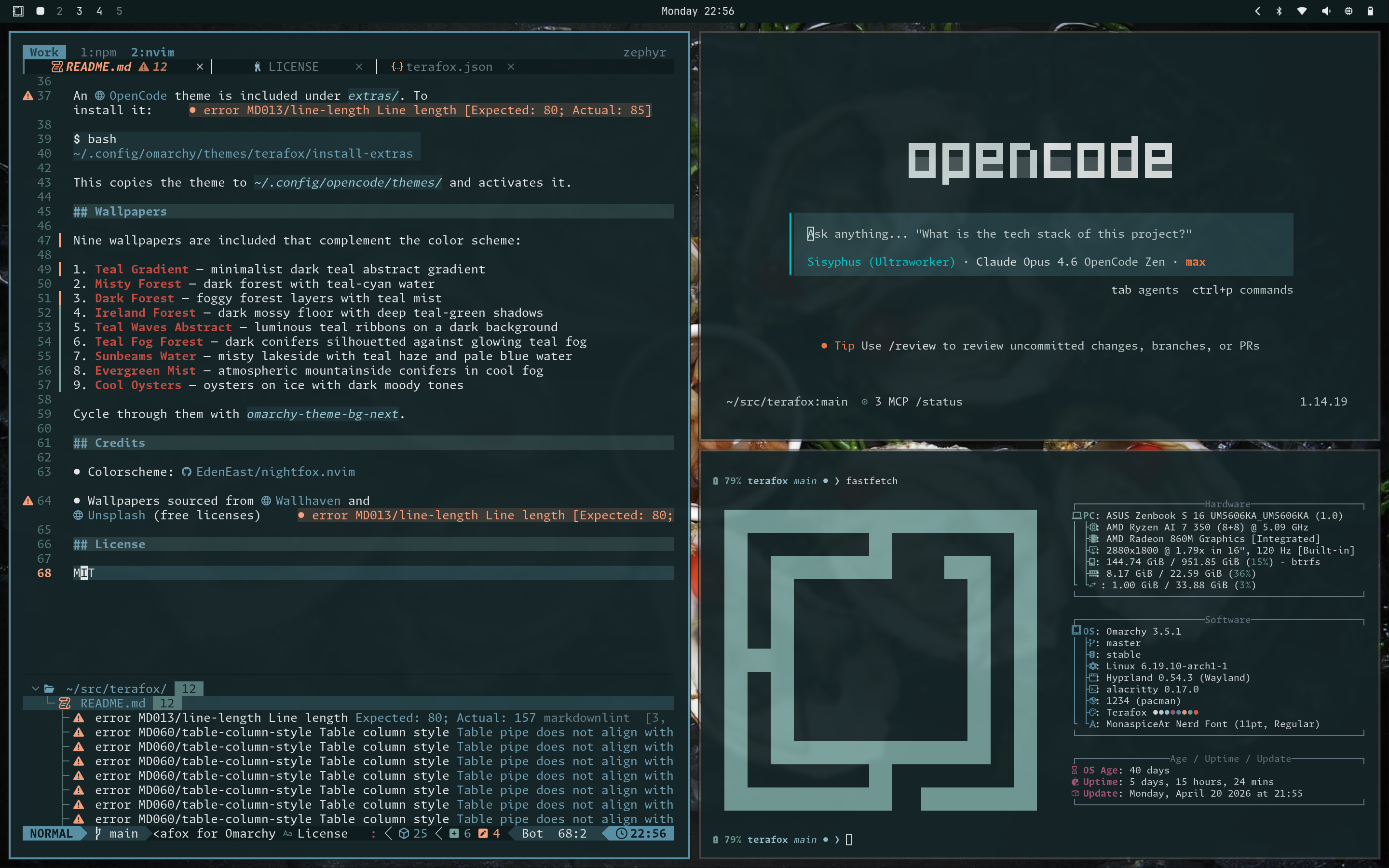
Palette
| Role | Color |
|---|---|
| Background | #152528 |
| Foreground | #e6eaea |
| Red | #e85c51 |
| Green | #7aa4a1 |
| Blue | #5a93aa |
| Cyan | #a1cdd8 |
| Magenta | #ad5c7c |
| Orange | #ff8349 |
| Yellow | #fda47f |
Install
omarchy-theme-install git@github.com:brianstarke/omarchy-terafox-theme.gitThis installs the theme and applies it immediately. It includes:
- Terminal colors (Alacritty, Kitty, Ghostty)
- Quickshell/OM shell styling
- btop theme (generated from the palette)
- Neovim colorscheme (via nightfox.nvim)
- VS Code: theme (via Nightfox extension)
- Prussian green icon set
- Quickshell lock screen logo
- Nine matching wallpapers
OpenCode theme (optional)
An OpenCode theme is included under extras/. To install it:
~/.config/omarchy/themes/terafox/install-extrasThis copies the theme to ~/.config/opencode/themes/ and activates it.
Lock Screen
A geometric cyberpunk fox logo is displayed on the v4 Quickshell lock screen.

Screensaver logo (optional)
An ASCII-art version of the fox logo is included as screensaver.txt. To use it as the terminal screensaver:
cp ~/.config/omarchy/themes/terafox/screensaver.txt \
   ~/.config/omarchy/branding/screensaver.txt
Plymouth boot screen (optional)
To also apply the logo to the Plymouth boot/SDDM login screen:
omarchy plymouth set-by-theme terafoxThis requires sudo and rebuilds the initramfs.
Wallpapers
Nine wallpapers are included that complement the color scheme:
- Teal Gradient — minimalist dark teal abstract gradient
- Misty Forest — dark forest with teal-cyan water
- Dark Forest — foggy forest layers with teal mist
- Ireland Forest — dark mossy floor with deep teal-green shadows
- Teal Waves Abstract — luminous teal ribbons on a dark background
- Teal Fog Forest — dark conifers silhouetted against glowing teal fog
- Sunbeams Water — misty lakeside with teal haze and pale blue water
- Evergreen Mist — atmospheric mountainside conifers in cool fog
- Cool Oysters — oysters on ice with dark moody tones
Cycle through them with omarchy theme bg next (or omarchy-theme-bg-next).
Credits
- Colorscheme: EdenEast/nightfox.nvim
- Wallpapers sourced from Wallhaven and Unsplash (free licenses)
License
MIT